
QUEST LOG · September 20, 2019· UPDATED December 17, 2025
Building a Free Blog with Hexo
For a variety of reasons, I've moved from Blogger over to GitHub Pages, and the Blogger site that kept me company for a semester has officially stopped updating. For old times' sake, here's the original site . Here's why I jumped ship to Hexo:
- The Blogger dashboard is really bare-bones (once you get the hang of it, it's hard to customize any further).
- The Markdown I'm used to writing has to be converted to HTML before I can paste it into the Blogger editor.
- Features are limited by Blogger itself.
- Even adding a code box means editing CSS; once you've tweaked a custom theme a bit, you basically never want to touch it again.
So I jumped ship~~
# Why GitHub Pages??
The reasons I chose GitHub Pages are simple:
- I can write posts directly in Markdown
- Markdown is really easy, and inserting code is simple
- Formatting is easy, so you can focus on the content of the post instead of HTML
- Basic syntax CheatSheet
- It can be hosted on GitHub Pages
- Just create a new repo called username.github.io on GitHub, and your home page is live at username.github.io
- No need to manage a server yourself; GitHub takes care of it
- I can manage my blog with git
- I can use branches and merges to manage the posts I'm currently changing
- Deleted posts can be recovered with git too
# Why Hexo??
Before Hexo I tried Jekyll , since I'm a bit more familiar with Ruby.
But there aren't many Chinese-language resources for Jekyll, and Ruby's performance on Windows... hmmm... not trying to start a flame war, but compared to Ruby, the Node.js that Hexo needs is friendlier to Windows.
I think the most important thing is that Hexo's author, tommy351 , is Taiwanese!! How could I not use it?
There are actually some technical reasons too! For example, with Ruby, site generation gets a lot slower once you have lots of posts. Some people have come up with ways to optimize Jekyll, but I didn't want to deal with all that hassle, so in the end I went with Hexo~
# Installation
Install Node.js
- First, download and install it from the Node.js official site
Install Hexo
- Install via npm
npm install hexo-cli -g
- Once it's installed, you can check the version with
hexo version
- Create your own blog
hexo init blog  #初始化blog
cd blog         #切換至blog資料夾
npm install     #安裝相關套件
hexo server #在localhost顯示頁面- Deploy your posts to GitHub
deploy:
    type: github
    repository: git@github.com:yourname/yourname.github.io.git
    branch: master
I won't go over how to connect GitHub to your local machine here.
- Run the deploy
hexo d
If you get ERROR Deploer not found, run the followingnpm install hexo-deployer-git --save
# Making the Blog Pretty
Of course, the most important part of using Hexo is making your blog look nice~
I use Next : clone it into the themes folder, then change this line.
## Extensions
## Plugins: https://hexo.io/plugins/
## Themes: https://hexo.io/themes/
theme: next #修改這行
Then you can follow the official site to tune your very own Next.
# Writing Posts in an Editor
I write my .md files in vscode, which lets me preview as I write, super convenient. Paired with the terminal, I can write and publish quickly
hexo clean
hexo d -g #d部屬 g=generate
That's all it takes to turn your md files into HTML and deploy them to your GitHub.
# Changing the Title Color
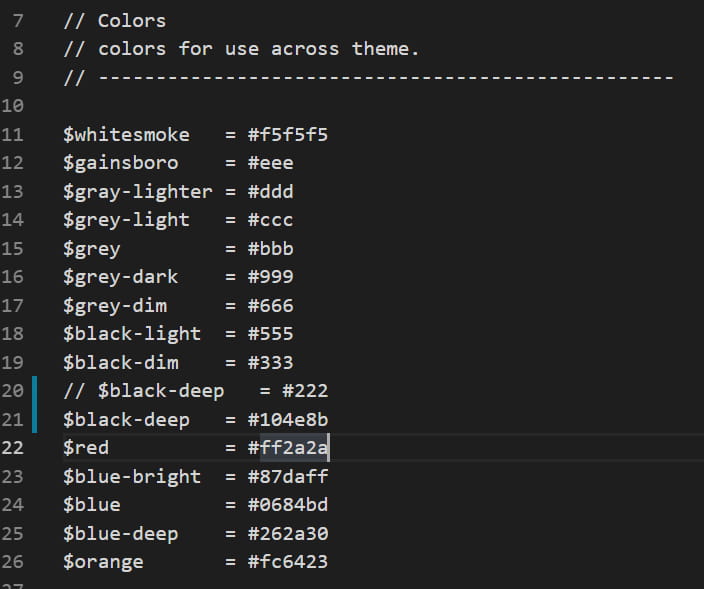
In source/css/_variables/base.styl there's the original color code
Pick a color you like with w3s and check it out with hexo s
# Extra: Live2D Mascot
I won't say too much here
First, install the live2d pkg
npm install --save hexo-helper-live2d
Pick your favorite 2D girl
npm install {你選的}
Add this whole chunk to
_config.yml
live2d:
  enable: true
  pluginModelPath: assets/
  model:
    use: live2d-widget-model-haru/02 # 改成你選擇的
  display:
    position: right
    width: 150
    height: 300
  mobile:
    show: false  #手機顯示
# Reference
Hexo installation guide and notes
Hexo + GitHub: even beginners can set up a blog fast
Build your own blog with Hexo
Adding a Live2D mascot animation to Hexo
hexo-helper-live2d
Apps I ship
Free on iOS and Android.
AniSeekr
Track anime across MAL, AniList, Bangumi and three more, then visit the real places from the scenes.
Solid(ar)ity
A privacy-first identity wallet: zero-knowledge proofs and signed cards swapped face to face, no central server.