
QUEST LOG · October 26, 2019· UPDATED December 17, 2025
Adding the utterances Comment System to the Hexo NexT Theme
# Intro
I happened to be redecorating my
hexoblog and realized I still didn't have a comments section
Nextactually already comes with a lot of comment systems built in, e.g. Disqus, gitment, etc...I don't really use Disqus, and signing up for yet another account is painful for someone as chronically lazy as me, so I turned to
gitment, a tool that turns GitHub issues into a comment system.But while reading around, I came across this post: Everyone should stop using Gitalk, Gitment, and other GitHub OAuth Apps that ask for excessive permissions .
hmmm... I don't want to get messed with by some malicious engineer QAQ
# Why Utterances
So I went with utterance
It also uses GitHub to store comments, which is a really fun approach.
And it asks for way fewer permissions. Genuinely great tool.
# Setup
# Authorization
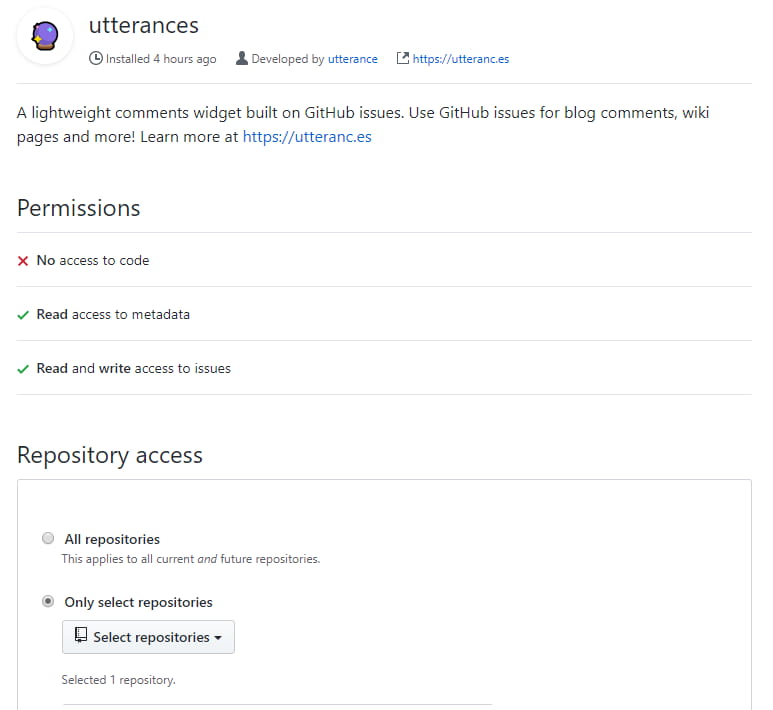
Authorize utterances so it can take comments and post them to the Issues in your repo
First open this link https://github.com/apps/utterances
It'll ask you to authorize it; I picked my hexo blog repo
# Configuration
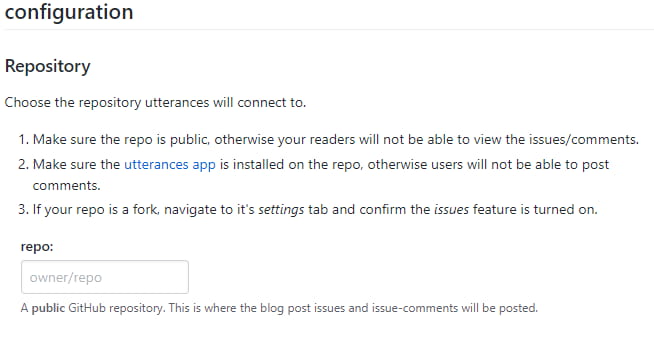
Head to this URL https://utteranc.es/
In the repo: field under configuration, enter the repo you just authorized
Then copy this script
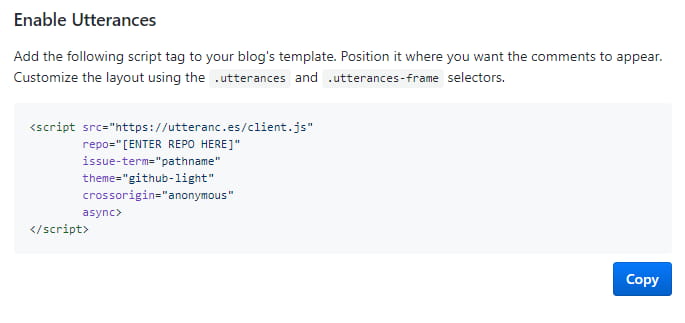
e.g. you can add a label so the comments look nicer in Issues
# Setting it up in Next
In commenets.swig inside the theme\next\layout\_partials folder, add
  {% if theme.utterances.enable %}
    <div class="comments" id="comments">
        <script src="https://utteranc.es/client.js"
                repo="[ENTER REPO HERE]"
                issue-term="pathname"
                label="💬"
                theme="github-light"
                crossorigin="anonymous"
                async>
        </script>
    </div>
Just put it right after
{% if page.comments %}and you're good
Then, in the theme config file _config.yml, add
# utterances
utterances:
  enable: true
And that's it~~ (confetti)
# Summary
There's actually also an npm module, Hexo NexT Utteranc , but I don't think it's worth installing yet another thing; the official instructions are already very detailed.
If you have any questions, feel free to leave a comment.
Apps I ship
Free on iOS and Android.
AniSeekr
Track anime across MAL, AniList, Bangumi and three more, then visit the real places from the scenes.
Solid(ar)ity
A privacy-first identity wallet: zero-knowledge proofs and signed cards swapped face to face, no central server.